
1. Review the RFQ Email
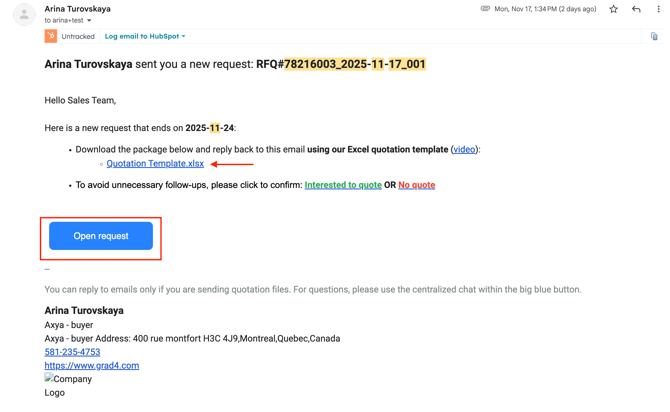
When your client sends an RFQ through Axya, you will receive an email notification.
The email includes:
-
RFQ name and client name
-
A unique RFQ identifier (used to match your quote)
-
The RFQ due date
-
Download links for RFQ documents
You can also reply directly to the email to ask questions or communicate with your client.
2. Download RFQ Files
Your email may include two types of files:
Technical Files (ZIP)
Contains drawings or additional documents uploaded by your client.
This link only appears if files were added.
Quotation Template (Excel Bid Sheet)
An optional Excel file where you can enter your:
-
Unit price
-
Lead time
-
Comments
Cells in grey contain client information and cannot be modified.
You may also submit your own Excel or PDF quote instead of using the template.
3. Submit Your Quote
You can submit your quote using three methods.
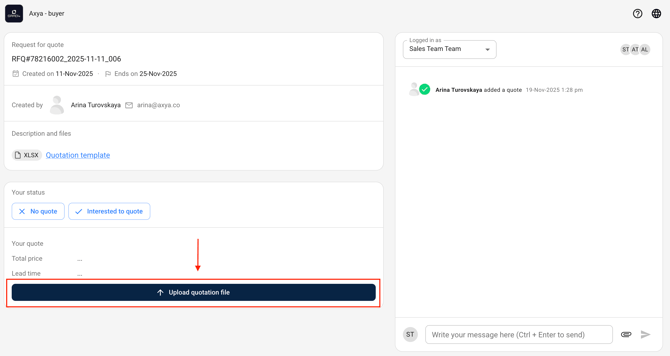
Option 1 — Upload via “Open Request”
-
Open the RFQ email.
-
Click Open Request.
-
Upload your Excel or PDF quote.
-
Click Send Quote.
No login is required.
Option 2 — Reply to the RFQ Email
-
Click Reply to the RFQ email.
-
Attach your Excel or PDF quote.
-
Add comments if needed.
⚠️ Do not change the subject line, as it contains the RFQ identifier used to sync your quote.
Option 3 — Email Axya Engineering
Send your quote to:
Attach your quote and include the RFQ identifier or RFQ name in the subject line so the system can match it to the correct request.
Security Notice
For security reasons, RFQ links expire after 72 hours.
If the link has expired, you will be asked to enter your email address to reactivate access.
Who Receives RFQ Notifications?
Your client manages the distribution list of recipients in your organization.
Contact your client if the recipient list needs to be updated.
If you have any additional questions, please contact us at customerservice@axya.co.